How to Turn Instagram Comments Into Qualified Leads
A Comment-To-DM Flow Built On Meta's Rules, With A Simple Lead Scorecard
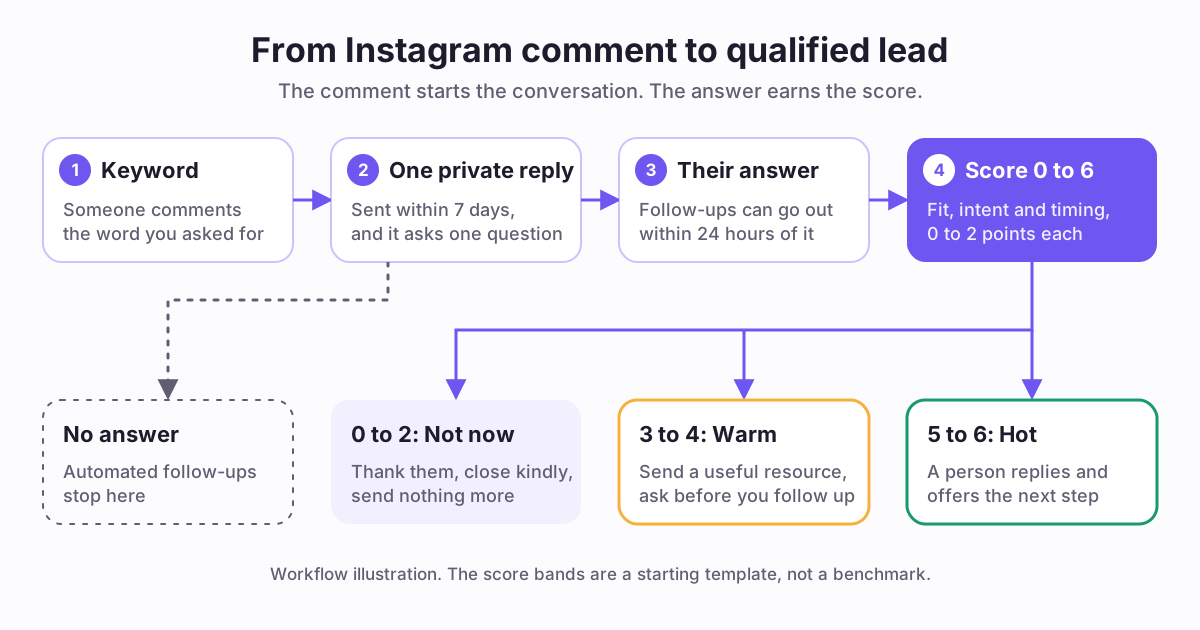
How do you turn Instagram comments into qualified leads?
Ask for one keyword in the comments. Send one private reply that delivers your promise and asks one question. Score the answer for fit, intent and timing. Then send the person to the right next step.
A comment lead is a person who commented your keyword. A qualified lead is a person who also fits your offer and wants it soon enough to act. This guide closes the gap between the two.
Comment-to-DM automation is software that sends a private message when a comment matches a rule. It starts the conversation. It does not qualify anyone. Qualification begins when the person answers.
This guide covers one step only: comment, DM, qualified lead. It does not cover your content strategy, your ads or your whole funnel.
Key takeaways:
- One comment earns one private reply, so that reply must ask for an answer.
- Follow-ups need a response, and they must go out within 24 hours of it.
- A keyword shows curiosity. Fit, intent and timing show a lead.
- Automation sorts people. A person should talk to your best leads.
What does Instagram allow in a comment-to-DM flow?
Start with the rules, because they decide the shape of the flow. These limits come from Meta's developer documentation. They apply to apps that send messages through its API, so they apply to automation tools. You need an Instagram professional account, which can represent a business or a creator.
The design rule is simple. The first DM must earn an answer. Without one, the automated conversation ends.
Meta also has a Human Agent tag for replies from a person, within 7 days of a user's message. Its allowed use is human support for issues that the standard window cannot resolve. Do not plan an automated sales sequence around it.
- Timing: a private reply must go out [within 7 days of the comment](https://developers.facebook.com/documentation/instagram-platform/private-replies). On Instagram Live, it can only go out during the broadcast.
- Count: only one message can be sent to the commenter.
- Follow-ups: they can go out only if the person responds, and within 24 hours of that response.
- Folder: the reply lands in Inbox if the person follows you. If not, it lands in the Request folder. It also includes a link to the post.
- Size: message text must be [1000 bytes or less](https://developers.facebook.com/documentation/instagram-platform/instagram-api-with-instagram-login/messaging-api).
- Promotion: messages inside the standard window [may contain promotional content](https://developers.facebook.com/documentation/business-messaging/messenger-platform/policy).
- Disclosure: automated chats must disclose automation when the law requires it. Meta recommends doing so even where it is not required.
How do you set up the comment keyword to DM flow?
Build one flow for one post first. You can copy it after you see real replies.
- Step 1: Pick one offer for the post. Choose a thing you can deliver in a DM, such as a checklist or a short guide.
- Step 2: Choose one keyword. Use a short, distinct word tied to the offer. Avoid words people type anyway, such as "info" or "yes".
- Step 3: Write the call to action. Name the word, what they get and that it arrives by DM.
- Step 4: Write the first DM from the template in the next section.
- Step 5: Add a short public reply. Tell people to check message requests if they do not follow you.
- Step 6: Rotate two or three public replies. Meta names [repetitive content](https://transparency.meta.com/policies/community-standards/spam/) as an indicator of spam.
- Step 7: Turn on the automation as soon as the post is live, then test it from a second account.
- Step 8: Read the first replies yourself. Fix the first DM if people seem confused.
What should the first DM say?
The first DM has four jobs, and you get one message to do them. Keep it short enough to read on a phone.
Use reply words for the question. Two or three choices are easy to answer, and automation can act on them. An open question gives you richer answers, but it needs a person to read them.
Decide when to deliver the free item. No public benchmark we could verify shows which order wins, so choose by your offer:
- Say it is automated: "Hi, this is an automated reply."
- Deliver the promise: "Here is your checklist: [your link]."
- Ask one question: "Reply PAID if you want paying clients this quarter. Reply HOBBY if you do this for fun."
- Give an exit: "Reply STOP and I will not message you again."
- Send the item first if your comment prompt promised it. People should get what they were told they would get.
- Ask first if the offer is a call, an audit or a paid service, and you cannot serve everyone.
How do you qualify a lead from an Instagram DM?
Qualify on what the person says, not on the comment. Everybody who typed your keyword wanted the free item. Only their answer shows whether they might buy.
Score three signals from 0 to 2. The full scorecard is in the reference tables on this page.
Ask only questions that change what you do next. If your offer costs a lot, add a budget question once fit is clear. Ask for a range, not an exact number.
Add the three scores for a total from 0 to 6. Treat 5 or 6 as hot, 3 or 4 as warm, and 0 to 2 as not now. These bands are a starting template, not a benchmark. Change them after you review real conversations.
- Fit: is this the person your offer is for? Ask about their role, level or situation.
- Intent: do they want your help, or only the free item? Ask what they want to solve.
- Timing: when do they want to act? Ask about their deadline or next step.
What do you do with each lead after scoring?
Route people quickly. A hot lead who waits a day may lose interest, and the automated window may close.
Keep a simple log in a sheet or CRM. Record the handle, post, keyword, three scores, next step and date. Keep only what you need.
If you ask for an email, say what you will send and how often. Add the address only after a clear yes. In the United States, marketing email must explain how to opt out and include a valid physical postal address. Senders must honor opt-outs within 10 business days. Other countries have their own rules. This is general information, not legal advice.
- Hot: a person replies in the thread and offers one next step, such as a call or a booking link.
- Warm: send one more useful resource. Ask if they want email updates.
- Not now: thank them and close kindly. Send nothing more.
- No answer: stop. Automated follow-ups need a response. Let your next post earn a new comment.
- Opt-out: stop at once, whatever their score was.
Worked example: a comment-to-DM flow for a portfolio review (illustration only)
This is an illustration only, not a customer story. A photography mentor sells paid portfolio reviews. She posts a Reel about three mistakes that weaken a portfolio. The caption says: "Comment PORTFOLIO and I will DM you my free checklist."
The first DM reads: "Hi, this is an automated reply. Here is your checklist: [link]. One quick question. Reply PAID if you want paying clients this quarter. Reply HOBBY if you shoot for fun. Reply STOP and I will not message you again."
A person who replies HOBBY gets a thank-you and a link to a free tutorial. The flow ends there.
A person who replies PAID gets one more message: "Great. What do you shoot most, and when do you want your first paid booking? I read every answer myself."
One answer says: "Weddings. I have my first enquiry and want to book by March." The mentor scores fit 2, intent 2 and timing 2. The total is 6, so she replies herself and offers a review slot.
Another answer says: "Not sure yet, maybe next year." She scores fit 1, intent 1 and timing 0. The total is 2, so she thanks the person and closes the thread.
How do you know the flow is working?
Count five things for each post. Then find the step where people drop away, and fix that step first. We do not quote typical rates, because we could not verify a public benchmark. Compare each post with your own last post.
Tag your links with the free UTM builder, so visits appear under the right post in your analytics. For stronger calls to action, read Instagram captions that convert.
- Keyword comments: a low count points to the post or the prompt. Rewrite the call to action.
- DMs sent: a gap here points to a setup issue. Check the keyword and the active dates.
- Replies: a low count points to the first DM. Make the question easier to answer.
- Qualified leads: a low count points to the offer. The post may attract the wrong people.
- Next steps taken: a low count points to the handoff. Reply faster, and offer one clear step.
How do you run this flow in Repping.AI?
AutoDM is the Repping.AI feature for this flow. It works on Instagram only. It is included with the Creator plan for connected Instagram accounts, and the Free plan does not include it. See current plans.
The setup follows the flow in this guide:
Each message can also use AI drafts. Each request returns three versions and uses up to 2 credits. You review every draft before it goes into an automation.
Know the limits before you start. AutoDM does not score leads or store answers as lead records. Keep the scorecard in your own sheet or CRM. It checks for new comments on a schedule, about every 10 minutes by default, so replies are not instant. The Test button runs a simulation and sends no real message.
AutoDM treats a reply of STOP, UNSUBSCRIBE or CANCEL as an opt-out. Its Sent count includes only messages that Instagram confirms as delivered. Link opens count the first redirect per button link, and link previews may count. Links typed into message text are not counted.
- Step 1: Connect your Instagram professional account and open AutoDM.
- Step 2: Create a comment automation. Add up to five keywords and choose the posts or reels. Matching ignores case and finds the word inside a longer comment.
- Step 3: Write one initial text reply. Put any links in this message, because buttons need a reply first.
- Step 4: Turn on the optional public reply and add more than one version.
- Step 5: Turn on "After they reply to your DM". Set an exact reply phrase, such as PAID. That phrase must appear in your first DM.
- Step 6: Add up to ten responses. They go out only if the person replies within seven days of your first DM. You can add one scheduled follow-up inside the 24-hour window.
- Step 7: For a second answer, such as HOBBY, add a DM keyword automation with the exact message match.
- Step 8: Activate every automation for 1 to 3 days. Renew them by hand while the post still earns comments.
Reference tables
Instagram rules that shape a comment-to-DM flow
Each rule comes from Meta's developer documentation. These rules apply to apps that send messages through Meta's API.
| Rule | What Meta says | What to do |
|---|---|---|
| Reply timing | A private reply must be sent within 7 days of the comment. On Instagram Live, it can only be sent during the broadcast. | Keep your automation on while the post still earns comments. |
| Reply count | Only one message can be sent to the commenter. | Make the first DM deliver your promise and ask one question. |
| Follow-ups | Follow-up messages can only be sent if the recipient responds. They must be sent within 24 hours of the response. | Give people an easy way to answer. |
| Folder | The reply appears in Inbox if the person follows the account, or in the Request folder if they do not. | Tell non-followers where to look. |
| Message size | Message text must be UTF-8 and 1000 bytes or less. | Keep the DM short. Emoji use more than one byte. |
| Promotion | Messages sent within the standard messaging window may contain promotional content. | You can make an offer inside the window. |
| Disclosure | Automated chat experiences must disclose automation when the law requires it. Meta recommends it as best practice elsewhere. | Say the first DM is automated. |
| Rate limit | Apps can make 750 calls per hour per professional account for private replies on posts and reels. | Expect delays when a post takes off. |
Source: Meta for Developers: Send a Private Reply to a Commenter, Send Messages, Instagram Platform overview, and Messenger Platform and IG Messaging API policy. Retrieved 2026-11-05.
Comment lead scorecard
Score each answer from 0 to 2 on three signals. Add the points for a total from 0 to 6.
| Signal | 0 points | 1 point | 2 points |
|---|---|---|---|
| Fit | Outside the people you serve | Close, but one detail is unclear | Clearly the person your offer is for |
| Intent | Wanted the free item only | Curious, and asked a question | Asked about working with you, or about price |
| Timing | No plan to act | Some time in the next few months | Wants to act within weeks |
Source: Repping.AI template, created 2026-11-05. It is a starting point, not a benchmark. Change the labels to match your offer.
Frequently asked questions
How do I get leads from Instagram comments?
Ask for one keyword in your caption, and send a private reply to each person who comments it. That reply should deliver what you promised and ask one question. Score the answer for fit, intent and timing. Then hand the strongest leads to a person. A comment alone is not yet a lead.
Is automated lead qualification allowed by Meta?
Meta documents private replies and automated chat experiences for its messaging API, so this method has a documented path. Stay inside the limits: one private reply, follow-ups only after a response, and disclosure of automation where the law requires it. This is a plain reading of Meta's documents, not legal advice.
Does the person need to follow me first?
No. Meta says a private reply goes to the person's Inbox if they follow your professional account. If they do not follow you, it goes to the Request folder. Non-followers can miss it there, so add a short public reply that tells them where to look.
Why did only some of my commenters get the DM?
The comment may have missed the keyword, or it may fall outside the automation's active dates. The person may have opted out. Non-followers may not see the reply, because it sits in Requests. Meta also limits private replies on posts and reels to 750 calls per hour per account. A busy post can lag.
Can I collect email addresses inside Instagram DMs?
Yes, you can ask, and people can choose to answer. Say what you will send and how often. Add the address to your list only after a clear yes. If you send marketing email in the United States, follow CAN-SPAM. Other countries have their own rules, so check the ones that apply to you.
What if someone goes quiet mid-flow?
Stop the automation for that person. Meta allows follow-ups only when someone responds, and they must go out within 24 hours of that response. Once that time passes, leave them alone and let your next post earn a new comment. If they message you later, pick the conversation back up.
Does comment-to-DM automation work on Reels?
Yes. Meta's private reply guide covers comments on posts, reels, stories, Live and ad posts. Live is the exception on timing, because replies can only go out during the broadcast. In Repping.AI, AutoDM comment triggers work on the posts and reels you select in the automation builder.
Sources and references
The 7-day limit, the one-message limit, the Live exception, the 24-hour follow-up rule, and the Inbox or Request folder delivery.
Retrieved
The standard messaging window, promotional content inside it, the Human Agent tag, and disclosure of automated chat experiences.
Retrieved
The 1000-byte text limit and the Primary and Requests inbox folders.
Retrieved
The professional account requirement, the Human Agent usage rule, and the private reply rate limit.
Retrieved
Meta names repetitive content as an indicator of spam that can lead to account restrictions.
Retrieved
Opt-out explanation, valid physical postal address, and the 10 business day limit for honoring opt-outs in marketing email.
Retrieved
Related reading
Build an Instagram lead generation funnel in four stages. See which steps you can automate under Meta's messaging rules and what to measure in each.
Write Instagram captions that convert with Hook-Value-CTA, AIDA, and PAS frameworks, clean formatting, one clear call to action, and clear disclosure.
Plan waitlist content for a product that is not live yet: say what exists, share progress honestly, ask for input, and keep promises you can keep. Free worksheet.
Related product pages
Run this flow with AutoDM
AutoDM handles the keyword, the private reply and the reply step for connected Instagram accounts. You keep the scoring and the human conversation.
See how AutoDM works