How to Track Conversions From Social Media Posts
UTM Links, Key Events, Attribution Limits, And A Post-To-Customer Sheet
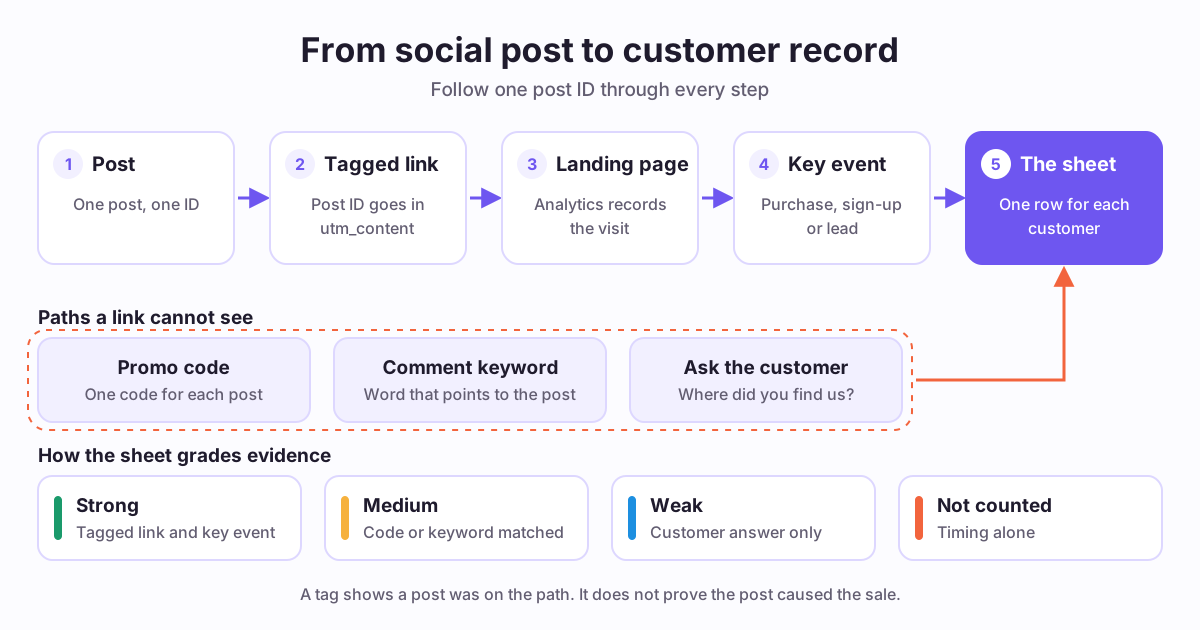
How do you tag each post with UTM links?
Google says you should always use utm_source, utm_medium and utm_campaign. A missing parameter shows as (not set) in your reports.
Those three tags name the platform and the launch. They do not name the post. For that, add utm_content. Google describes it as a way to differentiate creatives, so it is the natural place for a post ID.
Values are case sensitive, so Instagram and instagram count as two sources. Use lowercase every time. Write your rules down once, and copy them from the sheet.
Use social as the medium for organic posts. Google's Organic Social channel accepts it. For paid posts, start the medium with paid, because the Paid Social rule matches that pattern.
Here is a tagged link. It is an illustration only: https://example.com/class?utm_source=instagram&utm_medium=social&utm_campaign=bread_class&utm_content=ig_1105_reel
Our free UTM link builder adds source, medium and campaign. It has no utm_content field today, so add &utm_content=your_post_id to the end by hand. Then open the link once to check that it works.
Never put a name or email address in a tag. Google says the URL path and parameters must be free of personal information.
- utm_source: the platform, such as instagram or youtube.
- utm_medium: social for organic posts, or a value that starts with paid for ads.
- utm_campaign: the offer or launch, such as bread_class.
- utm_content: the post ID from your sheet, such as ig_1105_reel.
What do you do when the link sits in your bio?
A bio link serves every post at once. Its tag can tell you the visit came from your profile. It cannot tell you which post sent the person there.
Tag each link on your bio page by offer, so you can at least separate offers. Then add a second signal for the post itself. Use the options below, and write the choice in your sheet.
- Use a tagged link inside the post wherever the platform makes that link clickable.
- Use a promo code that belongs to one post, then count it in your store.
- Use a comment keyword that sends a tagged link in a direct message.
- Ask one question at checkout or in your first reply: where did you find us?
Which conversions should you track as key events?
Google defines a key event as an event that measures an action that is particularly important to your business. Any event you collect can become one. You mark it with the star icon in your Analytics settings.
Pick the action closest to money. Google's recommended events cover the common cases, so you rarely need a custom name.
Check the handoff to your store. If checkout runs on another domain, your site may never see the purchase. Stripe Payment Links, for example, accept UTM codes. You must set the confirmation behavior to redirect, and the redirect URL then contains those codes. Make one test purchase before you trust the setup.
Then read the result. The Traffic acquisition report shows session source, medium and campaign. For the post itself, use Session manual ad content, the dimension that utm_content fills.
- purchase: a person completes a purchase. Use it if you sell through your own site.
- sign_up: a person signs up for an account on your site or app.
- generate_lead: a person submits a form or a request for information.
How do you build a post-to-customer sheet?
A post-to-customer sheet is a small spreadsheet that joins each post to the customers it may have brought. It has two tabs: Posts and Customers. Copy the columns from the reference tables on this page.
Here is a worked example. It is an illustration only, not a customer story. A baker sells a paid class through an outside store. An Instagram reel uses the keyword CRUST, and a YouTube video uses a tagged link. After a week, the reel shows three strong and one medium customer. The video shows one strong and two weak. The baker repeats the reel's topic and tests the video again, because four customers is still a small number.
- Step 1: Create a Posts tab and give every post a unique ID.
- Step 2: Build a tagged link for each post, with the ID in utm_content.
- Step 3: Record the date, platform, offer and tracking method when you publish.
- Step 4: Copy visits and key events for each post ID once a week.
- Step 5: Create a Customers tab and add each new customer by order number.
- Step 6: Match each customer to a post ID and give the match a grade.
- Step 7: Count customers for each post, with one column for each grade.
- Step 8: Write one decision for each post: repeat, fix or stop.
How do you read the sheet without fooling yourself?
A sheet makes guesses look like facts, so read it with care. Compare posts that promote the same offer. A cheap download and a paid class do not convert in the same way.
Keep the grades apart. Report strong and medium customers as your count, and show weak answers next to them. Weak answers still help, because they point to posts your links missed.
Be careful with small numbers. A few customers can come from luck, so treat a good result as a reason to run the post again. Repeat the idea, then see if the result holds.
Bring the sheet into your weekly analytics routine. If you paid a creator to promote your offer, try the influencer campaign ROI calculator. It turns your tracked revenue into a planning estimate.
What can Repping.AI track, and what can it not?
Repping.AI does not attribute customers or revenue to your posts. It has no UTM or conversion report. Use your analytics tool and your store for those steps. You also do not sell through Repping.AI today. You link to your existing store, booking page or payment service from your creator page, so purchase data stays there.
It does help with the steps around that work. Each item below describes what exists now. Metrics vary by platform, so check the analytics coverage before you plan your sheet.
- Post metrics: the Creator plan collects post metrics daily on platforms with a live adapter. These are platform numbers such as views and likes. Pinterest also reports clicks.
- Channel analytics: these cover YouTube only.
- Link in Bio: the overview shows today's views, clicks and top links. You can paste tagged URLs into your links. Repping.AI does not pass tags from your page URL on to those links.
- AutoDM: Creator includes it for connected Instagram accounts. A comment-keyword automation can watch specific posts and send a button link. Repping.AI counts the first tap on each delivered button link, and a tagged URL keeps its tags. A tap is a click, not a customer.
- UTM link builder: the free tool adds source, medium and campaign tags.
Key takeaways
- Put a post ID in utm_content, or you can only compare launches and platforms.
- A bio link needs a second signal, such as a code, a keyword or a question.
- Mark the action closest to money as a key event, then test the whole path once.
- Grade your evidence, and keep weak answers out of the count.
- A tag shows that a post was on the path. It does not prove cause.
Reference tables
Posts tab: one row for each post
Copy these columns into any spreadsheet. The two rows are illustration only, not customer data.
| Post ID | Date | Platform | Offer | Tracking method | Visits | Key events | Strong | Medium | Weak | Decision |
|---|---|---|---|---|---|---|---|---|---|---|
| ig_1105_reel | Nov 5 | Bread class | Keyword: CRUST | 42 | 4 | 3 | 1 | 0 | Repeat the topic | |
| yt_1103_video | Nov 3 | YouTube | Bread class | Tagged link in description | 15 | 1 | 1 | 0 | 2 | Test again |
Source: Repping.AI template. Sample rows are illustration only.
Customers tab: one row for each new customer
Use an order number, not a name. Keep the sheet private. The two rows are illustration only, not customer data.
| Order number | Date | Post ID | Evidence | Grade | Order value | Notes |
|---|---|---|---|---|---|---|
| 1001 | Nov 6 | ig_1105_reel | utm_content matches, purchase key event | Strong | 40 | Bought on the first visit |
| 1002 | Nov 9 | yt_1103_video | Answered: saw your video | Weak | 40 | No tag on the order |
Source: Repping.AI template. Sample rows are illustration only.
Evidence grades
Record the grade for each customer. Report each grade on its own line.
| Grade | What you have | How to use it |
|---|---|---|
| Strong | A tagged link and a key event in the same session | Count it for that post |
| Medium | A promo code or keyword that belongs to one post | Count it, and note that codes can be shared |
| Weak | The customer named the post or platform | Keep it separate from the count |
| Not counted | The sale came soon after the post, with no other link | Do not credit the post |
Source: Repping.AI template. A working rule for this sheet, not an industry standard.
Frequently asked questions
What is UTM in social media marketing?
UTM parameters are labels added to the end of a link. When someone clicks the link, your analytics tool records the labels with the visit. In social media marketing, they name the platform, the campaign and, through utm_content, the post. They only work on links, so a view with no click leaves no record.
How to track UTM data?
In Google Analytics, open the Traffic acquisition report to see session source, medium and campaign. To see a single post, use the Session manual ad content dimension, which utm_content fills. Then compare it with your key events. Other analytics tools use different names, so check how yours stores campaign values before you build the sheet.
Is UTM tracking still used?
Yes. Google Analytics documents UTM tagging for campaign data, and Stripe accepts UTM codes on Payment Links. Tags remain a simple way to label a link. They do not solve everything, because a person who never clicks leaves no tag. That is why this guide pairs tags with codes, keywords and customer answers.
How to track influencer conversions?
Give each creator a separate tagged link and a separate promo code. Put the creator's name or handle in utm_content, then mark the purchase as a key event. Record each order in your sheet with its grade. Codes can spread beyond the audience you paid to reach, so read them as medium evidence, not proof.
How long should you wait before you judge a post?
Wait at least as long as your usual buying decision takes. A low-cost download may convert within days, while a paid class can take weeks. Google's default lookback window for most key events is 90 days. Pick one review date for every post of the same offer, so that your comparison stays fair.
Can Repping.AI show which post brought a customer?
No. Repping.AI does not attribute customers or revenue to posts. It shows post metrics on platforms with a live adapter, Link in Bio clicks, and AutoDM link taps on Instagram. Use those numbers beside your own analytics tool and your store. A post-to-customer sheet is the place to join them together.
Sources and references
UTM parameter definitions, the three parameters to always use, (not set) values, case sensitivity, and the Traffic acquisition report.
Retrieved
Maps utm_content to the Manual ad content dimensions.
Retrieved
Defines Session manual ad content and how utm_content populates it.
Retrieved
Definitions and rules for Direct, Organic Social and Paid Social.
Retrieved
Definition of a key event.
Retrieved
Marking an event as a key event with the star icon.
Retrieved
The purchase, sign_up and generate_lead events.
Retrieved
Definition of attribution, the available models, and how direct visits receive credit.
Retrieved
Default and optional key event lookback windows.
Retrieved
Cookies, cookieless pings and modeling when consent is denied.
Retrieved
How User-ID measures journeys across devices.
Retrieved
URL paths and parameters must be free of PII.
Retrieved
UTM codes on Payment Links and the redirect setting they need.
Retrieved
What the Meta Pixel tracks and where tracked conversions appear.
Retrieved
Related reading
Build an Instagram lead generation funnel in four stages. See which steps you can automate under Meta's messaging rules and what to measure in each.
Free weekly social media analytics report template: group posts by goal, log audience language, and end with calendar changes for next week.
Turn Instagram comments into leads with a keyword-to-DM flow built on Meta's one-reply rule, plus a 6-point scorecard to qualify every answer.
Related product pages
See what Repping.AI measures today
Check which platforms have post metrics before you plan your sheet. Your analytics tool and store still hold the conversion data.
See analytics coverage